

IMX678 on KNEO Pi - IMX678.ko loads but probe fails + missing VIC symbols

Hi,
I'm trying to use an IMX678 camera on KNEO Pi. I have copied the IMX678.ko files to the modules directory and loaded it, but I'm getting the following errors:
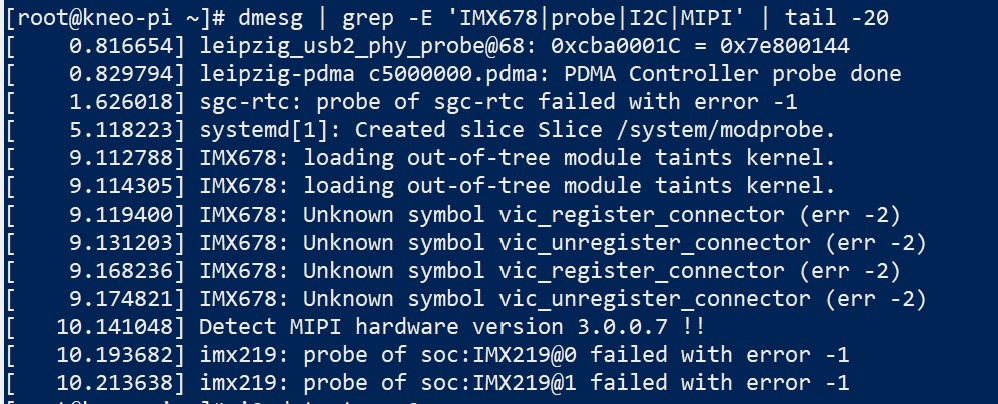
I have the following files:
imx678_3840x2160_ch0.cfg
LSC bin files
Resource folders (AE, AWB, ISP, VIC, etc.)
Command uname -r returns:
6.1.0-1
Command ls /lib/modules/ returns:
6.1.0-1 7.1.1-1-aarch64-ARCH
Questions:
1. Do I need additional VIC / ISP kernel modules? (I only have IMX678.ko)
2. What is the correct loading order?
3. Is there a specific config needed for IMX678 on KNEO Pi?
4. Can you provide the complete driver package for kernel 6.1.0-1 (or 7.1.1)?
5. Is there any required power-up sequence or GPIO config for the IMX678 on KNEO Pi?
Thanks!
Comments
@kchen@ivcco.com
Hi kchen,
Based on the current information, the issue may be related to a mismatch between the IMX678 camera driver, kernel version, KNEO Pi image, or device tree configuration.
Therefore, before confirming the required loading order or whether any additional modules are needed, we would like to first check the source and version compatibility of the IMX678 driver package.
Could you please help confirm the following information?
1. Where did you get the IMX678.ko driver from?
2. Which KNEO Pi image version are you currently using?
3. Was the IMX678.ko built specifically for the 6.1.0-1 kernel, or for another kernel version?
After we confirm the driver source and image version, we can further check whether any additional configuration is required for IMX678 on KNEO Pi.
Best regards,
Andy Hsieh
Hello Andy,
Thanks for the response. To answer your questions:
1. I got it from the forum, here is the link:
https://www.kneron.com/forum/discussion/577/missing-imx678-support-files-driver-dts-config-ini-for-kl730-platform/p1
2. I downloaded this image: kneo_pi_hdk_12G_v1.2.6.img.xz
3. Not sure, the post doesn't mention a specific kernel version for the IMX678.ko build, just that it was updated in November last year.
Thanks!
Hello,
The image "kneo_pi_hdk_12G_v1.2.6.img.xz" is for KNEO Pi, which is a GUI OS for users to easily use the provided functions. But user is NOT allowed to develop basic HW functions on KNEO Pi OS.
If you want to build driver, please use KL730 SDK instead. And the IMX678 driver is also built in the SDK as a default sensor. Note that the SDK is only terminal console without GUI. You can download the SDK in Development Center and find the document files inside.
Hello,
I couldn’t find the exact option shown in the picture you provided on the Development Center page. Could you share the download link, or confirm whether the one below is the same?
Thanks!
Hello,
To reach the SDK of KL730, you need to get the permission priorly.
Please contact your purchase window to get the authority of access.
Hello Ethon,
What do you mean "purchase window"? Our Sales representative? He has told us to use this forum to get help.
Thanks
Yes, you can use this forum to discuss corresponding issues you encountered. But we don't have the authority to grant you downloading permission.
Before you get the contents of the SDK, you should sign some NDA or paper contract. That's why we suggest you contact the purchase window.
You can reach the purchase window through your sales representative and check the download authority.
Hello Ethon,
According to our Sales Representative, our developer log in should all the permissions to download all related documents and firmware. We don't seem to be able to find the KL730 SDK.
Hello,
Do you have an account for Developer Center?
https://www.kneron.com/en/support/developers/
The download permission depends on the account you login with. If you don't have any account, you should apply for it through the purchase window.
Or if you have an account but you still can't find the SDK file while you login, you can apply for access right through the purchase window as well.
The screen shot you posted is our Document Center, there is lots of corresponding information of usage but there is no file there. Please download files from the Developer Center. And all corresponding KL730 documents are included in the KL730 SDK file.
Hi,
We have the KL730SDK, the documentation mentions a ready-to-use kernel in SDK/04_Firmware/kernel, does that kernel include the IMX678 driver or do we need to create a new kernel to add that driver?
Also, once we have the kernel, can we create a bootable SD card with it? (similar to the image we dowloaded before). Our objective is to get video from the IMX678 into the Pi board and stream it over the network using RTSP to a different machine using VLC as the client, do you see any other possible drivers/modules we might need to add/enable in the kernel (network, video encodign, etc.) to make this work?
Thanks!
Hi,
To update to the latest SDK environment, you can refer to Chapter 4.1 in the "KL730_HDK_Board_User_Manual.pdf" document included in the HDK. (The HDK means board of KNEO Pi.)
And in Chapter 4.5 of the "KL730_HDK_Board_User_Manual.pdf" document, there is an example that guides you on how to stream using the IMX678.
Regarding the demo_out preparation, please refer to Chapter 4.5 in "KL730_EVM_Board_User_Manual.pdf"; the driver for the IMX678 is included in the demo_out file.
Note that the document previously mentioned is included in the KL730 HDK.
About the boot SD, please realize that the SDK development is totally different from the KNEO Pi OS operation. SDK only allows to use the console interface without GUI. If you want to create a boot SD (without GUI) for HDK board, you can refer to Chapter 8.5 SD Boot in the SDK document "KL730_Development_Environment_User_Guide.pdf".
Hi,
Thanks for replying. Could you please clarify the following?
1. We can create a bootable SD card with the kernel we build as long as we don't need a GUI, correct? We intend to manage the board using SSH, so a GUI is not needed.
2. Does the pre-built kernel Image (in SDK/04_Firmware/kernel) already include the IMX678 driver, or do we need to rebuild the kernel to add it?
3. Regarding the demo_out folder that contains the IMX678 driver: Is it possible to make this demo_out folder in a host machine using “./build.sh” and “/build_demo.sh” to then copy this demo_out folder into our existing KNEO Pi OS image (the one we flashed before, kneo_pi_hdk_12G_v1.2.6.img.xz), and run the command “./drivers/driver.sh;./start.sh” from there?
Our current goal is not full development; it is only to boot an image (console is fine) from SD card with IMX678 working + RTSP streaming to a VLC client on another machine.
Thanks again!
Hello,
The pre-built images include the driver for IMX678, but the driver is not in the "kernel" image. You can find the driver IMX678_v1.0.0.5.ko at "/02_APP/02_Software_Tool_Kit/SDK/drivers", but you still need a demo_out to run an application to handle the streaming process.
And you can build demo_out without rebuilding kernel previously. But you can only build demo_out in the toolchain environment provided in the SDK.
Please refer to the chapter 「5.1.1 Pre-Built Toolchain」in the 《KL730_Development_Environment_User_Guide.pdf》to create your toolchain environment. Then you can build demo_out on it.
Hi,
We successfully built the demo_out for IMX678 at 3840x2160 using the SDK toolchain.
We now want to create a bootable SD card following Chapter 8.5 SD Boot.
The pre-built files in 04_Firmware are named differently than what it is shown in chapter 8.5 and appear to be for SPI-NAND:
Can you tell us the exact four files (bl2/bl31/bl32/bl33) and the correct u-boot.env content (or file) that should be used for SD boot on the KNEO Pi HDK? Do you have a ready u-boot.env (or the text content) that should be used for SD boot?
After the four bootloader files are on the FAT32 card, how should the kernel (Image), DTB (leipzig-hdk-kneo-pi.dtb) and rootfs be provided? Do they also go on the same FAT32 volume, or is another step required?
As mentioned before, we want to create a single image file that we can burn to an SD card and then boot the board with the IMX678 + RTSP streaming from demo_out.
Thanks!
Hello,
To program flash for board HDK, you need to update all binaries listed in <Table 4-1 Pre-Built Firmware for HDK>. You can find the table and program commands in chapter 4.1 Firmware Update in the HDK document <KL730 Series HDK Board User Manual.pdf>.
And we don't have a ready u-boot.env, you can follow the instructions in chapter 8.3.1 Example Environment File – SPI NAND in <KL730_Development_Environment_User_Guide.pdf> to create the env file.
If you want to put your demo_out into a binary for programming, you can refer to 10.4.1 UBIFS in <KL730_Development_Environment_User_Guide.pdf> to create your own ubifs file.
And when you program with the commands in chapter 4.1 Firmware Update (step 9), add the following extra command to program ubifs:
fatload mmc 0:0 0xa00000 file_name.ubifs;mtd erase ubifs_a;mtd write ubifs_a 0xa00000 0x0 ${filesize}
Hi,
Quick question about the Device Tree:
Table 4-1 and the commands in Chapter 4.1 use leipzig-hdk-2ch.dtb.
We also have leipzig-hdk-kneo-pi.dtb in the SDK.
For the KNEO Pi HDK + IMX678 camera, which DTB should we use?
Thanks!